Showing posts with label critique 3. Show all posts

Wednesday, January 26, 2011

Functional Specifications Sheets

These are my functional specifications sheets. Click to enlarge the images.


Conceptual Diagram!

Floor plan
The photo booth will be divided into 2 - interactive area and control centre.

Left Side View -Interactive area
User will be provided with webcam and touch screen panel to interact with the application. Spotlight is used to give the better lighting in photo captured.


Right Side View - Control Centre
There are two monitor provided; 1 touchscreen panel faced on interactive area and 1 for developer to control the system.

Flowchart

This is the flowchart of the application!

Tuesday, January 25, 2011

Face Detection Software

I have found a website that provide me a list of face detection software and SDKs either it is for free or for commercial purpose. I found that this website really helps me in discovering about this features

This is the link of the website:
http://www.facedetection.com/facedetection/software.htm

This site is developed by Dr. Robert Frischholz as a tribute to Peter Kruizinga 's Face Recognition Homepage.

Application Story/Flow Board

After consulting my idea with both of the lecturers, I have reconstructing and enhanced my ideation for the best outcome. I have combining my idea of Facebook apps game with my previous idea of editable photo booth. This is the details of my ideation concepts.

1. User entered interactive area to interact with the application. The developer controlled the program in control center.

2. User then can activate the program by clicking on “START” button. This intro page will provide title, basic description, and also tag line to the user.

3. User will be directed to “Instruction Page” after clicking on “START” button. After done with the instruction, user may proceed to the next page.

4. Terms and Conditions are applied in order to keep this application safe and on track. User need to agree with T&C before proceed to the next page.

5. The camera is triggered by face detection. The camera will start snapping the pictures when it detects face.

6. The image taken will be shown up. User will be asked either they like the picture or not ; if yes, proceed to next page and if no, back to previous page

7. User then can edit their pictures. Features available are brightness, saturation, contrast, color; rotate, move, resize, and adding background images

8. When they are done, they may choose either want to download the picture, email it or join the network.
Download - The picture will be sent to user’s phone via Bluetooth
Email - User need to key-in their email address
Join the network - User need to fill-in the form

9. If the user choose to join the network, they need to key-in their personal data. Personal data : name, age, interest, nationality, sex, language, email. Save the data to proceed to the next stage.

10. The data then will be saved and displayed on the screen. The image will be floating on the screen. For indication purpose, blue is for man, pink is for woman. Click on the images to get to know the person better.

11. When clicked, the picture will be enlarged. Basic data will be shown. User need to click “LIKE” to be friend and click “X” to back to floating images.

12. MyTweetFace will send friend suggestion to users’ account. They may add them later. The reason of using friend suggestion; give user more space to decide either he/she like to be friend with other or not.

Friday, January 21, 2011

Tron Photobooth

This is a web photobooth that I found while browsing on Petrosains site. This application is to promote the movie - Tron Legacy. And here is some details about it.

1. Intro page - click on START to proceed

2. Choose the type of pictures that you want to take

3. Understand the instruction and agree with T&C. Then choose either to capture new image or upload from HDD.

4. Take another picture if you dont like it. Continue if you like the picture.

5. Edit your pictures with features provided.

6. Choose either want to post the picture on Facebook or save it on your computer.
*Post to wall is not functioning

Actually, I found this application after consulting my idea with Mr. KY n Mdm. Forest. So, I think I will use some features of this application to enhance my idea.

Saturday, January 15, 2011

National Art Gallery

13 Jan - Media Art's final year student had a trip to National Art Gallery. We have assigned to answer the question given by observing the artwork that have been exhibited there. My favorite artwork is "The new world disorder" by Mohd. Shaharudin Sabu.

The artwork that i chose is about the suffering that need to be face by some Muslim Country like Palestin and Afghanistan. The pictures drew is to portray their sadness while the mechanical human is to show how they need to continue their life with kinetic body due to the injury from the war.

Other than observing the artwork there, I have take this opportunity to consult my idea with Mdm. Forest and Mr. KY. They do approve my idea but with slightly change. They suggest me to be more specific about FB friends finding and combining the features of my previous proposal (editable photo-booth) into this application. I will look forward to this and try to improve my idea based on their suggestion. Thx to Mr. KY n Mdm. Forest to make me feel more comfortable with my idea.

Tuesday, January 4, 2011

Apps on Facebook.com

Introduction
  • Web apps that loaded in the context of Facebook (FB)
  • This apps give u opportunity to be parted of FB experience
  • The apps can be integrate with FB features like Request, Bookmarks and Page tabs to make it more likely a seamless part of FB experience.
  • Core FB Platform technologies available : [1]Social Plugins, [2]Graph API and [3]Platform Dialogs.

Getting Started
  • The apps can be build by using any language that supports web programming like PHP, Python, Java or C#.
  • Loaded into a [4]Canvas Page.
  • Populate the Canvas Page by providing a Canvas URL that contains the HTML, JavaScript and CSS.
  • When user request for the Canvas Page, the Canvas URL will be load within the [5]iframe.
  • Result : ur apps will be displayed in standard FB chrome.

For more details, i will refer to http://developers.facebook.com/docs/guides/canvas

Tuesday, December 21, 2010

Experiment 1.0

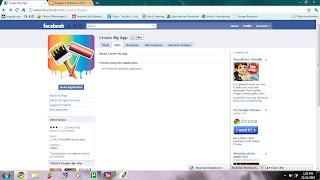
Yeay!! Finally, Facebook is back!! Immediately after i managed to connect with my Facebook, I searched for "apps creator" application in Facebook just to see how it works. Then i found one application called "Create My Apps" and decided to try it.

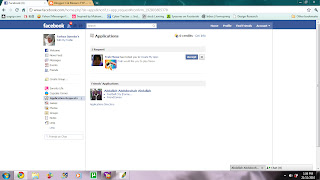
1. Click "Go To Application" to go to application page
The interface of Create My App's page.

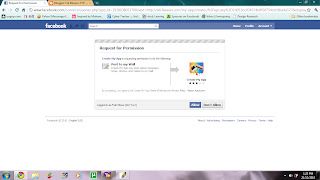
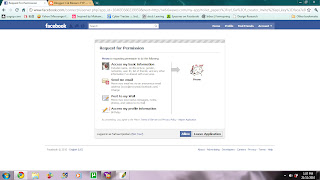
2. Allow application to access your account
Request for permissions interface

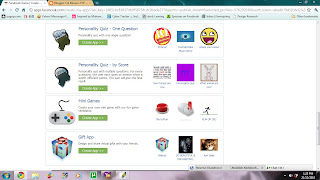
3. Choose the category of your application - either quizzes, mini games, etc
The choices of categories

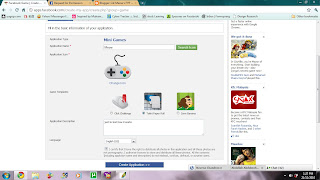
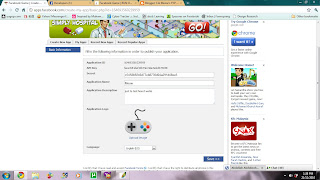
4. I have chose mini games category. So, I need to fill the information about my mini game.

The basic information form

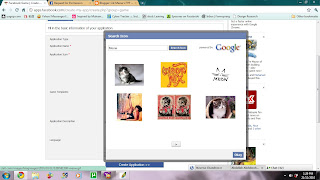
5. If you click on search icons, it will automatically search for icons according to your application name using Google images.
The result of search

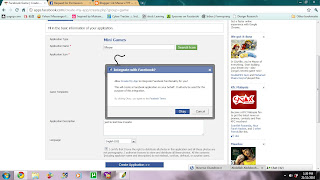
6. The application then will ask for ur permission to integrate with Facebook.
Permission to integrate

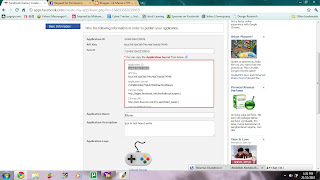
7. You need to enter Application Secret as authentication for your application.
Your application secret has been provided in the red box

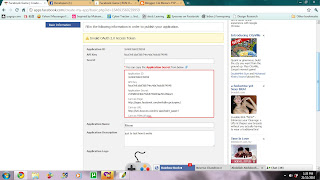
8. If u have entered the wrong Application Secret, they will tell you that u have invalid OAuth 2.0 Access Token
Error Page

OAuth 2.0 is stands for open standard of authorization. It is a protocol that provides a method for making authenticated HTTP requests using a token - an identifier used to denote an access grant with specific scope, duration, and other attributes. Tokens are issued to third-party clients by an authorization server with the approval of the resource owner. OAuth defines multiple flows for obtaining a token to support a wide range of client types and user experience.

9. After you are done with authentication, you need to save the details of your application.
Check it before save

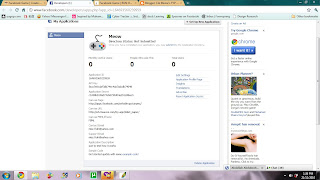
10. After you save it, your details of application will be showed. You may check it and edit it later.
Basic information

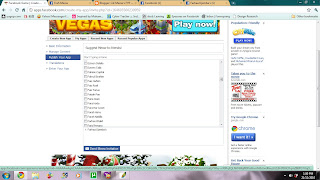
11. You need to invite your friends to use your application. You can choose to invite your friend from the list provided.
List of your friends

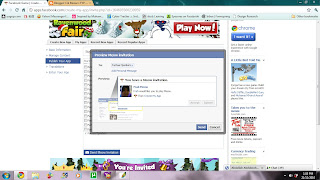
12. You then need to reconfirm your invitation list before sending it to your friends.
Invitation conformation

13. Your friends then will accept your request to ask them to use your application
Application request

14. They need to allow the application to access their account
Request for permission

15. After everything is done, they can start to play your game.
mini game from the templates

So, this is my first attempt of creating a Facebook apps. I will try to do a harder one later.

Monday, December 20, 2010

Problem 1

As i consult with Mdm. Forest today, i knew that i need to start with my experiments soon. So, i decided to do my 1st experiment today. But as i open my facebook to explore more on facebook apps, the page can't be reload. There are two possibilities that cause this problems.
  1. MMU have block Facebook from their networks.
  2. Facebook server is down.
But, as i asking my friends who are outside of MMU, there are nothing wrong with their facebook. So, it is clearly that Facebook have been block in MMU as other student also complaining about this on Cybertracker (intranet).

I hope that MMU will just temporarily block Facebook and I can continue with my final project soon. I also hope that the problem like this will never be happen on final exhibition next trimester.

Contextual Study


Social Networking + Application + Cam-whoring
  • Built an interactive installation
  • Create an application
  • might be game/photo booth
  • On/abt social networking site

The Contextual Study

1. Personal Context
  • Very attached to SNS
  • Gain a lot of friends
  • sentimental values

2. Social Context
  • connect with others
  • socialize people
  • self-expression apps

3. Cultural Context
  • a new trend
  • a new way o communicate
  • everyone have atleast 1 SNS

4. Institutional Context
  • Social behaviour on site
  • how social behave
  • How they react towards others on SNS